A biblioteca de mapas React com 9 kB.
Zero dependências. Sem Leaflet, sem Mapbox — só tiles, vetores e controle total.
npm install @brownie-js/reactimport { GeoMap, TileLayer, Marker } from "@brownie-js/react";
function App() {
return (
<GeoMap center={[-46.63, -23.55]} zoom={13}>
<TileLayer />
<Marker coordinates={[-46.63, -23.55]} />
</GeoMap>
);
}Por que BrownieJS?
Zero Dependências
Sem Leaflet, sem Mapbox. TypeScript puro — você controla cada pixel.
Bundle Minúsculo
~9kB gzipped. Mapas interativos sem inflar sua aplicação.
Amplamente Testado
Suite de testes abrangente cobrindo cada componente e hook.
Acessível
Navegação por teclado, labels ARIA, indicadores de foco. Conforme WCAG 2.1 AA.
Veja em ação
Mapa Interativo com Tiles
Tiles OpenStreetMap com marcadores, clusters, popups e círculos geográficos. Arraste e amplie para explorar.
import { useState } from 'react';
import { GeoMap, TileLayer, Marker, Popup, Circle, MapControl } from '@brownie-js/react';
import { MarkerCluster } from '@brownie-js/react/cluster';
import { ZoomControl, ScaleBar } from '@brownie-js/react/controls';

const animals = [
  { id: '1', name: 'Rex',  type: 'lost',  coordinates: [-46.65, -23.56] },
  { id: '2', name: 'Luna', type: 'found', coordinates: [-46.63, -23.55] },
  { id: '3', name: 'Max',  type: 'lost',  coordinates: [-46.64, -23.54] },
  { id: '4', name: 'Mel',  type: 'found', coordinates: [-46.62, -23.57] },
  { id: '5', name: 'Bob',  type: 'lost',  coordinates: [-46.66, -23.53] },
  { id: '6', name: 'Nina', type: 'found', coordinates: [-46.70, -23.50] },
  { id: '7', name: 'Thor', type: 'lost',  coordinates: [-46.58, -23.60] },
];

const lostColor = '#d4850c';
const foundColor = '#7c8b6f';

function PetFinderMap() {
  const [selected, setSelected] = useState(null);
  const animal = animals.find((a) => a.id === selected);

  return (
    <GeoMap center={[-46.63, -23.55]} zoom={13} mapLabel="Pet finder map">
      <TileLayer />
      <Circle center={[-46.63, -23.55]} radius={2000} color="#7c8b6f" />
      <MarkerCluster
        animated
        categoryKey="type"
        categoryColors={{ lost: lostColor, found: foundColor }}
      >
        {animals.map((m) => (
          <Marker
            key={m.id}
            coordinates={m.coordinates}
            color={m.type === 'lost' ? lostColor : foundColor}
            animated
            onClick={() => setSelected(m.id)}
          />
        ))}
      </MarkerCluster>
      {animal && (
        <Popup
          coordinates={animal.coordinates}
          onClose={() => setSelected(null)}
          image={{ src: 'https://placedog.net/400/200?random', alt: animal.name }}
        >
          <strong>{animal.name}</strong> — {animal.type}
        </Popup>
      )}
      <MapControl position="top-right">
        <ZoomControl />
      </MapControl>
      <MapControl position="bottom-left">
        <ScaleBar />
      </MapControl>
    </GeoMap>
  );
}Geolocalização
Detecte a posição do usuário com um marcador pulsante. Inicia simulado — clique no botão para usar sua localização real.
import { GeoMap, TileLayer, MapControl } from '@brownie-js/react';
import { Geolocation } from '@brownie-js/react/geo';
import { ZoomControl, ScaleBar } from '@brownie-js/react/controls';

function LiveLocationMap() {
  return (
    <GeoMap center={[-46.63, -23.55]} zoom={13} mapLabel="Location map">
      <TileLayer />
      <Geolocation
        watch={true}
        enableHighAccuracy={true}
        onError={(err) => console.warn(err.message)}
      />
      <MapControl position="top-right">
        <ZoomControl />
      </MapControl>
      <MapControl position="bottom-left">
        <ScaleBar />
      </MapControl>
    </GeoMap>
  );
}
Temas
Personalize todos os componentes com MapThemeProvider. Passe um objeto de tema e todos os marcadores, popups, controles e indicadores de foco se atualizam instantaneamente.
import { GeoMap, TileLayer, Marker, MapControl } from '@brownie-js/react';
import { MapThemeProvider } from '@brownie-js/react/theme';
import { ZoomControl, ScaleBar } from '@brownie-js/react/controls';

function ThemedMap() {
  return (
    <MapThemeProvider
      theme={{
        markerColor: '#d4850c',
        popupBg: '#1a0f0a',
        popupColor: '#f5f0eb',
        popupRadius: '12px',
        controlBg: '#1a0f0a',
        controlColor: '#f5f0eb',
        controlShadow: '0 2px 8px rgba(26,15,10,0.4)',
        focusRing: '0 0 0 3px rgba(212,133,12,0.4)',
      }}
    >
      <GeoMap center={[-46.63, -23.55]} zoom={13} mapLabel="Themed map">
       <TileLayer />
        <Marker coordinates={[-46.65, -23.56]} />
        <Marker coordinates={[-46.63, -23.55]} />
        <Marker coordinates={[-46.66, -23.59]} />
        <MapControl position="top-right">
          <ZoomControl />
        </MapControl>
        <MapControl position="bottom-left">
          <ScaleBar />
        </MapControl>
      </GeoMap>
    </MapThemeProvider>
  );
}Rotas
Roteamento rodoviário entre pontos usando OSRM. Explore diferentes modos de roteamento.
import { GeoMap, TileLayer, Marker, MapControl } from '@brownie-js/react';
import { Route } from '@brownie-js/react/route';
import { ZoomControl, ScaleBar } from '@brownie-js/react/controls';

function FixedRoute() {
  return (
    <GeoMap center={[-44.9, -23.2]} zoom={7} mapLabel="Route map">
      <TileLayer />
      <Route
        coordinates={[[-46.63, -23.55], [-43.17, -22.91]]}
        color="#d4850c"
        strokeWidth={3}
        routing={true}
        animated
        animationSpeed={2}
        onRouteLoaded={(data) =>
          console.log(`${(data.distance / 1000).toFixed(0)} km`)
        }
      />
      <Marker coordinates={[-46.63, -23.55]} color="#7c8b6f" animated />
      <Marker coordinates={[-43.17, -22.91]} color="#d4850c" animated />
      <MapControl position="top-right">
        <ZoomControl />
      </MapControl>
      <MapControl position="bottom-left">
        <ScaleBar />
      </MapControl>
    </GeoMap>
  );
}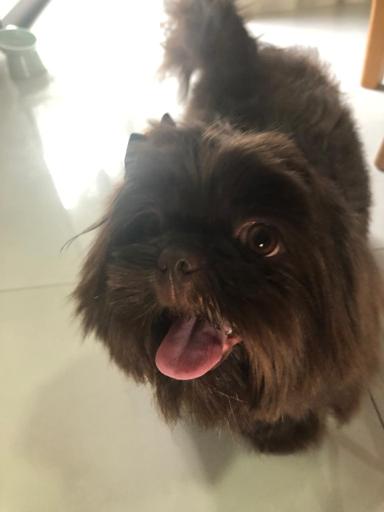
Por que "Brownie"?
Brownie era um Shih Tzu que chegou ao mundo nas nossas mãos e partiu da mesma forma — cedo demais, com apenas um ano e meio. Ele tinha um coração maior do que seu pequeno corpo podia conter. Esta biblioteca leva o nome dele porque todo projeto deveria ser construído com a mesma alegria que ele trazia a tudo que explorava. Mapas nos ajudam a encontrar caminhos. O Brownie nos ajudou a encontrar o nosso.
Mapas em 5 linhas de código.
Instale, componha, publique. BrownieJS funciona com qualquer setup React.
npm install @brownie-js/react