The 9 kB map library for React.
Zero dependencies. No Leaflet, no Mapbox — just tiles, vectors, and full control.
npm install @brownie-js/reactimport { GeoMap, TileLayer, Marker } from "@brownie-js/react";
function App() {
return (
<GeoMap center={[-46.63, -23.55]} zoom={13}>
<TileLayer />
<Marker coordinates={[-46.63, -23.55]} />
</GeoMap>
);
}Why BrownieJS?
Zero Dependencies
No Leaflet, no Mapbox. Pure TypeScript — you own every pixel.
Tiny Bundle
~9kB gzipped. Ship interactive maps without bloating your app.
Thoroughly Tested
Comprehensive test suite covering every component and hook.
Accessible
Keyboard navigation, ARIA labels, focus indicators. WCAG 2.1 AA compliant.
See it in action
Interactive Tile Map
OpenStreetMap tiles with markers, clusters, popups, and geographic circles. Pan and zoom to explore.
import { useState } from 'react';
import { GeoMap, TileLayer, Marker, Popup, Circle, MapControl } from '@brownie-js/react';
import { MarkerCluster } from '@brownie-js/react/cluster';
import { ZoomControl, ScaleBar } from '@brownie-js/react/controls';

const animals = [
  { id: '1', name: 'Rex',  type: 'lost',  coordinates: [-46.65, -23.56] },
  { id: '2', name: 'Luna', type: 'found', coordinates: [-46.63, -23.55] },
  { id: '3', name: 'Max',  type: 'lost',  coordinates: [-46.64, -23.54] },
  { id: '4', name: 'Mel',  type: 'found', coordinates: [-46.62, -23.57] },
  { id: '5', name: 'Bob',  type: 'lost',  coordinates: [-46.66, -23.53] },
  { id: '6', name: 'Nina', type: 'found', coordinates: [-46.70, -23.50] },
  { id: '7', name: 'Thor', type: 'lost',  coordinates: [-46.58, -23.60] },
];

const lostColor = '#d4850c';
const foundColor = '#7c8b6f';

function PetFinderMap() {
  const [selected, setSelected] = useState(null);
  const animal = animals.find((a) => a.id === selected);

  return (
    <GeoMap center={[-46.63, -23.55]} zoom={13} mapLabel="Pet finder map">
      <TileLayer />
      <Circle center={[-46.63, -23.55]} radius={2000} color="#7c8b6f" />
      <MarkerCluster
        animated
        categoryKey="type"
        categoryColors={{ lost: lostColor, found: foundColor }}
      >
        {animals.map((m) => (
          <Marker
            key={m.id}
            coordinates={m.coordinates}
            color={m.type === 'lost' ? lostColor : foundColor}
            animated
            onClick={() => setSelected(m.id)}
          />
        ))}
      </MarkerCluster>
      {animal && (
        <Popup
          coordinates={animal.coordinates}
          onClose={() => setSelected(null)}
          image={{ src: 'https://placedog.net/400/200?random', alt: animal.name }}
        >
          <strong>{animal.name}</strong> — {animal.type}
        </Popup>
      )}
      <MapControl position="top-right">
        <ZoomControl />
      </MapControl>
      <MapControl position="bottom-left">
        <ScaleBar />
      </MapControl>
    </GeoMap>
  );
}Geolocation
Detect the user's position with a pulsing marker. Starts simulated — click the button to use your real location.
import { GeoMap, TileLayer, MapControl } from '@brownie-js/react';
import { Geolocation } from '@brownie-js/react/geo';
import { ZoomControl, ScaleBar } from '@brownie-js/react/controls';

function LiveLocationMap() {
  return (
    <GeoMap center={[-46.63, -23.55]} zoom={13} mapLabel="Location map">
      <TileLayer />
      <Geolocation
        watch={true}
        enableHighAccuracy={true}
        onError={(err) => console.warn(err.message)}
      />
      <MapControl position="top-right">
        <ZoomControl />
      </MapControl>
      <MapControl position="bottom-left">
        <ScaleBar />
      </MapControl>
    </GeoMap>
  );
}
Theming
Customize every component with MapThemeProvider. Pass a theme object and all markers, popups, controls, and focus rings update instantly.
import { GeoMap, TileLayer, Marker, MapControl } from '@brownie-js/react';
import { MapThemeProvider } from '@brownie-js/react/theme';
import { ZoomControl, ScaleBar } from '@brownie-js/react/controls';

function ThemedMap() {
  return (
    <MapThemeProvider
      theme={{
        markerColor: '#d4850c',
        popupBg: '#1a0f0a',
        popupColor: '#f5f0eb',
        popupRadius: '12px',
        controlBg: '#1a0f0a',
        controlColor: '#f5f0eb',
        controlShadow: '0 2px 8px rgba(26,15,10,0.4)',
        focusRing: '0 0 0 3px rgba(212,133,12,0.4)',
      }}
    >
      <GeoMap center={[-46.63, -23.55]} zoom={13} mapLabel="Themed map">
       <TileLayer />
        <Marker coordinates={[-46.65, -23.56]} />
        <Marker coordinates={[-46.63, -23.55]} />
        <Marker coordinates={[-46.66, -23.59]} />
        <MapControl position="top-right">
          <ZoomControl />
        </MapControl>
        <MapControl position="bottom-left">
          <ScaleBar />
        </MapControl>
      </GeoMap>
    </MapThemeProvider>
  );
}Routes
Road routing between waypoints powered by OSRM. Explore different routing modes.
import { GeoMap, TileLayer, Marker, MapControl } from '@brownie-js/react';
import { Route } from '@brownie-js/react/route';
import { ZoomControl, ScaleBar } from '@brownie-js/react/controls';

function FixedRoute() {
  return (
    <GeoMap center={[-44.9, -23.2]} zoom={7} mapLabel="Route map">
      <TileLayer />
      <Route
        coordinates={[[-46.63, -23.55], [-43.17, -22.91]]}
        color="#d4850c"
        strokeWidth={3}
        routing={true}
        animated
        animationSpeed={2}
        onRouteLoaded={(data) =>
          console.log(`${(data.distance / 1000).toFixed(0)} km`)
        }
      />
      <Marker coordinates={[-46.63, -23.55]} color="#7c8b6f" animated />
      <Marker coordinates={[-43.17, -22.91]} color="#d4850c" animated />
      <MapControl position="top-right">
        <ZoomControl />
      </MapControl>
      <MapControl position="bottom-left">
        <ScaleBar />
      </MapControl>
    </GeoMap>
  );
}
Why "Brownie"?
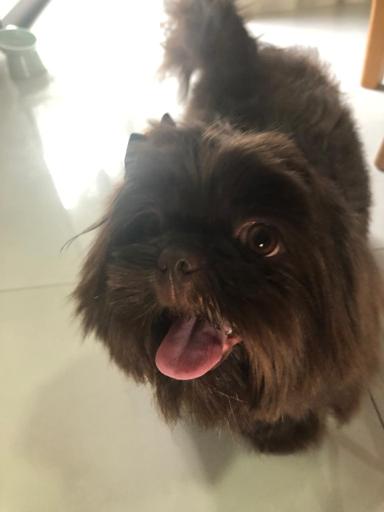
Brownie was a Shih Tzu who came into this world in our hands and left the same way — too soon, at just a year and a half. He had a heart that was bigger than his small body could hold. This library carries his name because every project should be built with the same joy he brought to everything he explored. Maps help us find our way. Brownie helped us find ours.
Add maps in 5 lines of code.
Install, compose, ship. BrownieJS works with any React setup.
npm install @brownie-js/react